AstroBotany · calibration card · design proposal for discussion
ABCD v2: a bigger calibration card with colours that mean something to plant and soil scientists
A card with colour patches, each defined by a Munsell colour notation and chosen to correspond to plant-tissue and soil colours. Its corner markers are standard ArUco markers (IDs ), so software can tell it apart from the original card (IDs ).
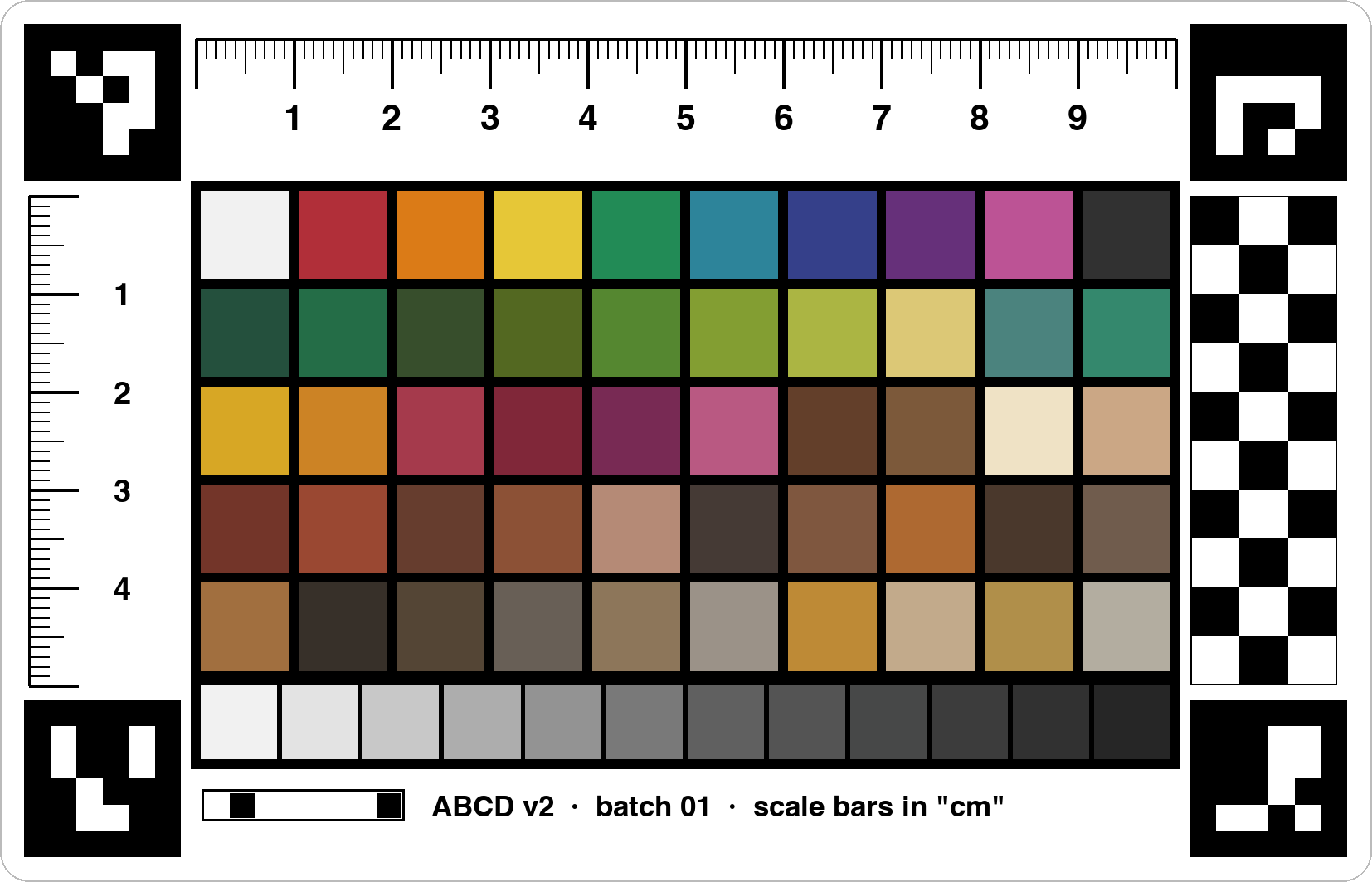
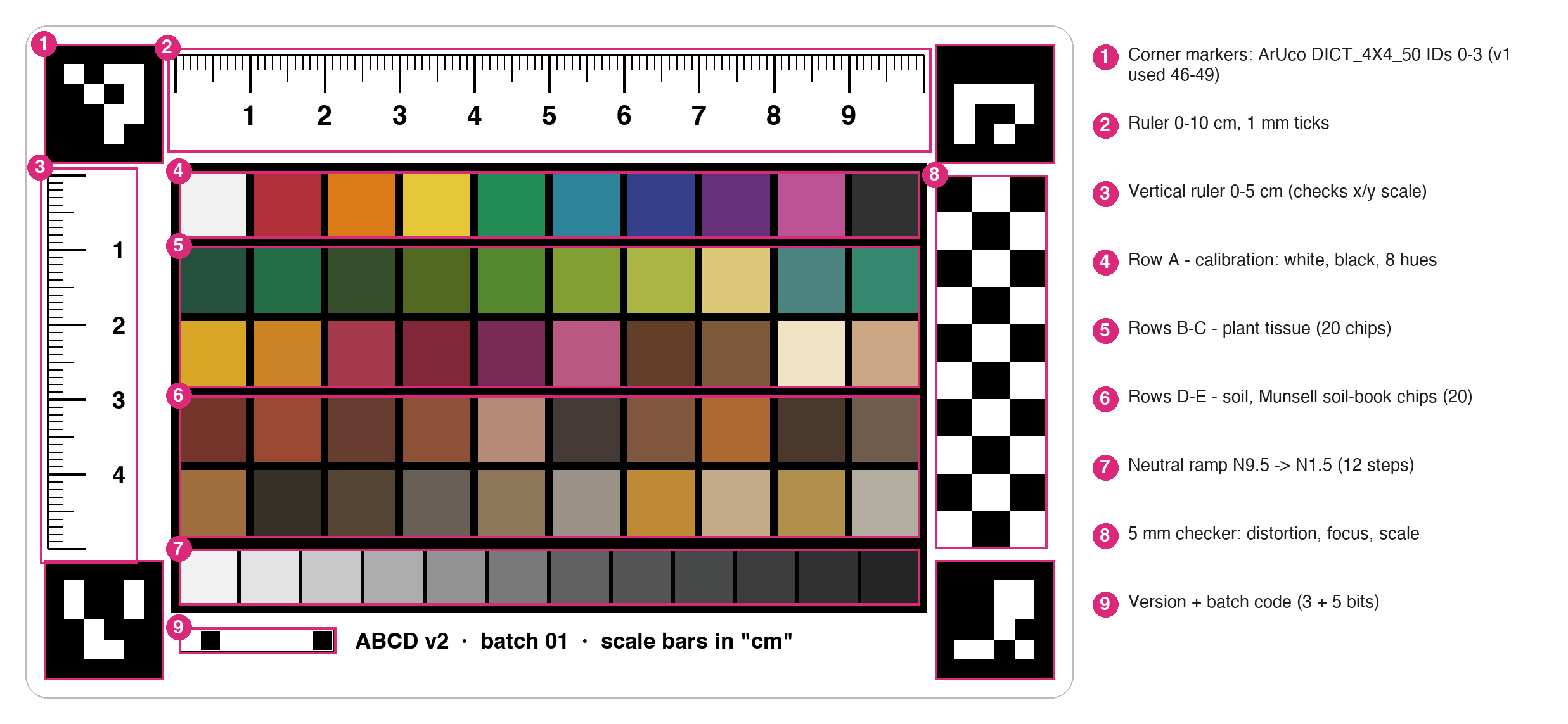
What is on the card
What changed from v1
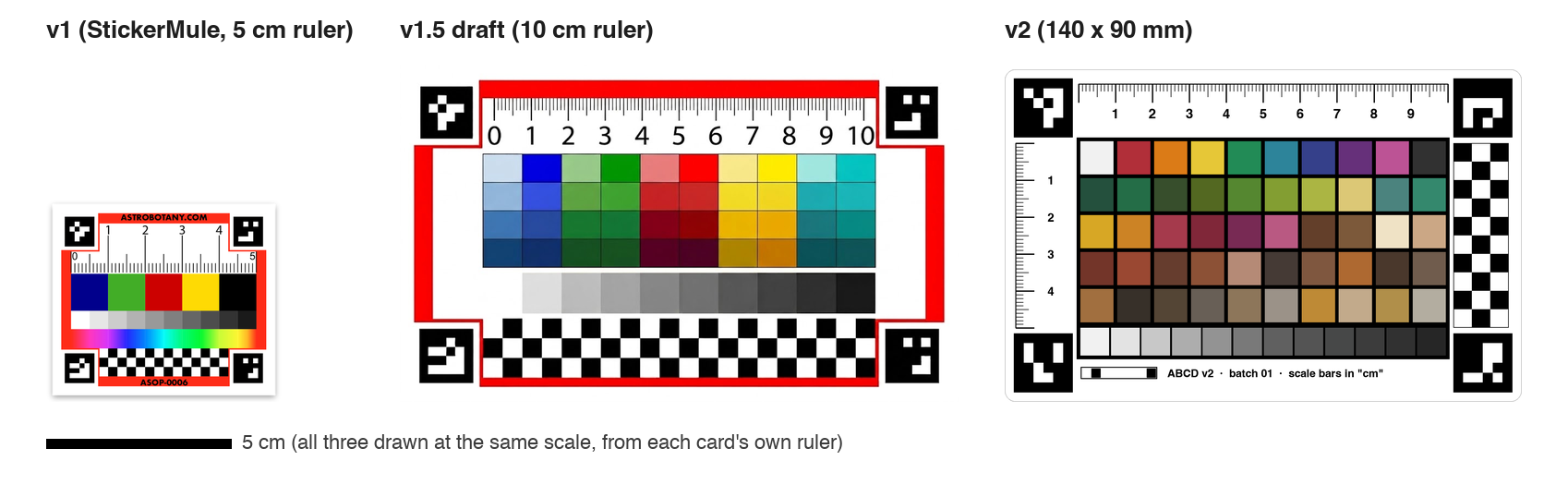
| v1 | v1.5 draft | v2 | |
|---|---|---|---|
| Ruler | 0–5 cm | 0–10 cm | 0–10 cm across + 0–5 cm down (checks that x and y scale agree) |
| Colour chips | 5 primaries | 40 saturated screen colours | , each a Munsell notation, in calibration / plant / soil groups |
| Frame | saturated red | saturated red | none; chips sit on black on a white card |
| Corner markers | ArUco IDs | same as v1 | ArUco IDs : the card identifies itself |
| Extras | rainbow strip, checker | checker | 5 mm checker, version + batch code |
Why the red frame went: red is the colour we most want to measure in plants (anthocyanin). A large saturated red area next to the subject competes with it in segmentation and pulls the camera's automatic white balance.
Why the v1.5 colours were replaced: pure screen blue, red and cyan are outside what a sticker press can print, so the printed patch would not match its file value. They also don't correspond to anything a plant or soil scientist records.
How the colours were chosen
Every chip is a Munsell notation (hue value/chroma, e.g. 7.5YR 5/6), the colour language soil scientists already use in the field and the basis of the Munsell Plant Tissue charts. The notation is the design; the printed colour is computed from it, then measured.
Pipeline as run: . Gate result: chips reduced (); largest remaining ΔE2000 (results/generator_log.txt).
Cross-check: for the chips it covers, our sRGB values match Andrew Werth's Virtual Munsell Color Wheel within /255 per channel ( soil chips use odd chromas or half values that tool doesn't show). It is built from the same renotation data, so this checks our conversion, not the data itself (results/werth_crosscheck.txt).
Calibration row (A)
White and black anchors plus eight hues spread around the colour circle at the highest chroma that prints. Gives the colour-correction fit something to grip on in every direction.
Plant tissue (B–C)
Healthy leaf greens, chlorosis yellow-greens, senescence yellows/oranges, anthocyanin reds and purples, necrotic browns, white and tan roots. Every hue is a page of the Munsell Plant Tissue Color Book; the exact value/chroma are design targets to confirm with consultants.
Soil (D–E)
Twenty chips that exist on the soil-chart pages (10R to 2.5Y), each labelled with the name printed there. The low-chroma greys span the darkness of grey regoliths. No chip claims to match a specific simulant or Apollo sample.
Neutral ramp
Twelve greys from N9.5 to N1.5, including N5 (≈ 18 % grey), for white balance and the camera's tone curve.
Chip explorer
Click a chip to see its notation, where it comes from, and its print, screen and gamut values. The grid is laid out as on the card.
All chips
Screen colours are approximate: your display isn't calibrated and the card isn't printed yet. Lab D50 is the print/measurement target. CMYK is from macOS's Generic CMYK profile and is a guide only; the sticker printer uses its own.
Corner markers: which card is this?
The corners are standard ArUco markers from OpenCV's DICT_4X4_50 dictionary (the "4x4" option on chev.me/arucogen). The original card already used IDs ; v2 uses IDs . Any ArUco reader therefore knows which card is in the photo and which corner is which, even if the card is sideways or upside down.
IDs 0–3 were the best-separated block of four in the dictionary: the minimum bit differences from the v1 markers, between each other and from their own rotations are in the log below, so a misread is very unlikely. OpenCV's own detector reads both cards correctly (results/aruco_ids.txt):
Detection tests
The calibration app's own detector was run on synthetic photos of both cards: flat, tilted, rotated and upside down, each also with a warm colour cast, noise and blur. Error is the largest distance between a found corner and the true marker centre. "Before" is the app as committed; "after" adds marker-ID checking.
Sources: results/detection_before.txt, results/detection_after.txt (scripts/run_all.sh). What the "before" failures mean:
- v2, tilted: without ID checks, the 50-chip grid looks like a rectangle of squares and wins over the corner markers.
- Both cards, upside down: corners were sorted by screen position, so an inverted card had its chips matched to the wrong references. Marker IDs fix the order.
Printing and measuring
- Print matte if possible: glare hides markers and chips (the app already has a fallback for photos where glare hides part of the card).
- Measure at least 3 stickers from each batch, every chip, with a spectrophotometer (D50 / 2°). Record L*, a*, b* in the batch template.
- Flag any chip whose sticker-to-sticker difference exceeds ΔE2000 2.
- Feed the measured values to the generator (--measured); they replace the design values the app uses.
- Each print run gets its own batch number in the card's 8-cell code (3 bits version + 5 bits batch).
Open questions for discussion
Each is a GitHub issue so comments stay in one place: open questions.
- Are the plant-tissue shades the right ones, and should any be swapped for actual Plant Tissue book chips?
- Should soil chips target specific regolith simulants (needs published Munsell values for them)?
- Card format: sticker vs laminated card, size, matte finish.
- Marker IDs and the version/batch numbering scheme for future cards.
- The v1 scale discrepancy: confirm on real photos, then correct the app.
- Who measures printed batches, and with what instrument?
Files and sources
- Munsell Soil-Color Charts scan (hue pages 10R–2.5Y): soils.uga.edu
- Munsell Plant Tissue Color Book, list of its 17 hue pages: vendor listing
- Munsell renotation conversion: colour-science (Python)
- Cross-check: Andrew Werth, Virtual Munsell Color Wheel
- ArUco markers: OpenCV tutorial · ArUco generator
- Original v1 sticker: StickerMule
- Everything here is regenerated by scripts/run_all.sh, scripts/make_figures.py and scripts/build_site.py in the repo.